One person, one account, access reviews and offboarding, reading the audit trail, backups, and national data standards.
PublishedNailathalaGipatikPepalwal:ReferencesMga SanggunianMga TinubdanReng Reperensya:3Audience: Designated medical records officers, custodians, and deputies in standalone and hospital-based hemodialysis units · hospital health information management staff assigned to dialysis · unit managers who supervise recordsRead timeOras ng pagbasaOras sa pagbasaOras ning pamamasa:
Training track for the records officers of hemodialysis units
This module is study material for the records officers of hemodialysis units. It explains the reasoning behind common records decisions; it is not a records manual and not legal advice. Regulations change: confirm every rule against the current text and your facility’s approved policy before you rely on it. Clinical content belongs to its clinical author; questions about a patient’s care go to the attending nephrologist. Every case, name, and identifier is fictional.
Learning objectives
After this module you should be able to
Explain why every user needs an individual account and why shared logins defeat custody.
Assign access by role and remove it promptly at departure.
Run a monthly access review and document each finding and action.
Recognize audit-trail signals worth escalating, and escalate without confronting the user.
Explain why a backup must be test-restored with its audit metadata.
Pre-testBefore you read, answer the 8 self-assessment questions and note your score. After the module, select New set of questions and compare. The difference is what you learned; the questions you still miss are what to reread.
Start here
The big picture, in plain words
In plain wordsOn paper, custody means a locked room, a key, and a sign-out sheet. Think of the electronic record as a building with a thousand doors. Each user carries a key card, and every door logs whose card opened it and when. The log is only useful if every card belongs to one person.
The picture is useful, and it has one limit. In a real building, a stranger walking the halls is noticed. In an electronic record, someone who opens a chart they have no reason to see looks exactly like someone doing their job. The only witness is the log, and the log is only read if someone decides to read it.
The audit trail is the electronic equivalent of fingerprints on a folder: it shows who opened a record, when, and what they changed. It works only if every user has their own account, and only if someone looks.
Figure 1 · Key terms for this module
Electronic medical record (EMR)The digital record of patient care within one facility or unit.
Role-based accessPermissions assigned by job role, so each person sees what their work needs.
Audit trailThe system log of who viewed or changed a record, and when.
Access reviewA regular check that every active account belongs to a current staff member with the right role.
OffboardingRemoving access when someone leaves or changes role.
Joint administrative order (JAO)An order issued jointly by the Department of Health and the Philippine Health Insurance Corporation.
Opening case · fictional
Case: The monthly review
On the first Monday of the month, you sit down with Mr. Paolo Navarro from IT to review the ten active accounts in your unit’s records system. Three things turn up.
Nurse Angelica Robles resigned three weeks ago. Her account is still active, and it was last used four days ago.
An account named “station2” has no owner. Mr. Navarro explains that the nurses on the floor share it so they do not have to log in and out between patients.
Ms. Josephine Aguilar, a claims clerk, opened the full clinical notes of Mr. Ramon Aguilar, a patient who shares her surname, three times last week. She has no claims work pending on his account.
Before reading on, decide:
What happens to each account, and how soon?
Do you speak to Ms. Aguilar about what you found?
What do you document?
Keep your answers in mind. The lesson gives you what you need, and the case review near the end shows one sound response.
Lesson · part 1
One person, one account, one reason to look
Every user has an individual account. Shared logins destroy attribution, and they fall short of the security safeguards the National Privacy Commission (NPC) expects for personal data.1 If ten nurses share “station2,” an entry made under it could have been made by any of them, and so, in practice, by none of them.
Access follows role. A technician does not need social-work notes. A claims clerk needs session and billing data, not full clinical narratives. A nurse needs the clinical record of the patients she treats. Staff open a record only when their work requires it. Curiosity, concern for a neighbor, and “I was just checking how he is” are not reasons.
Role
Usually needs
Usually does not need
Dialysis nurse
Clinical record of patients on her shift
Billing details
Technician
Treatment parameters, machine and dialyzer records
Social-work and psychiatric notes
Claims clerk
Sessions, Annex A, billing, eligibility
Full clinical narratives
Records officer
Broad access for custody tasks, all of it logged
Authority to edit clinical content
The monthly access review
Monthly, or as local policy says, the records officer reviews the user list with IT and the unit manager. Is everyone still employed? Is each role still accurate? Are any accounts dormant? Remove access promptly at departure, on the last working day, and document it. A nurse who moves to another unit in the same company changes role; her old access goes too.
Stop and call“Just use my password while I’m on leave” is a security incident, not a favor. Decline politely and report it. The fix is a properly authorized temporary account, not a borrowed one.
On the floor · The account of a nurse who left
Nurse Maricel Domingo moves to a hospital in Manila on a Friday. Her account is disabled that afternoon as part of the offboarding checklist.
On Monday a request arrives from the new hospital asking for a patient’s records “that Nurse Domingo will need.” Because her old access is gone, the request has to come through the release procedure, with the patient’s authorization, as it should.
Access belongs to a role in this unit, not to a person wherever she goes next.
Illustrative scenario. Names and details are invented.
Lesson · part 2
Reading the audit trail
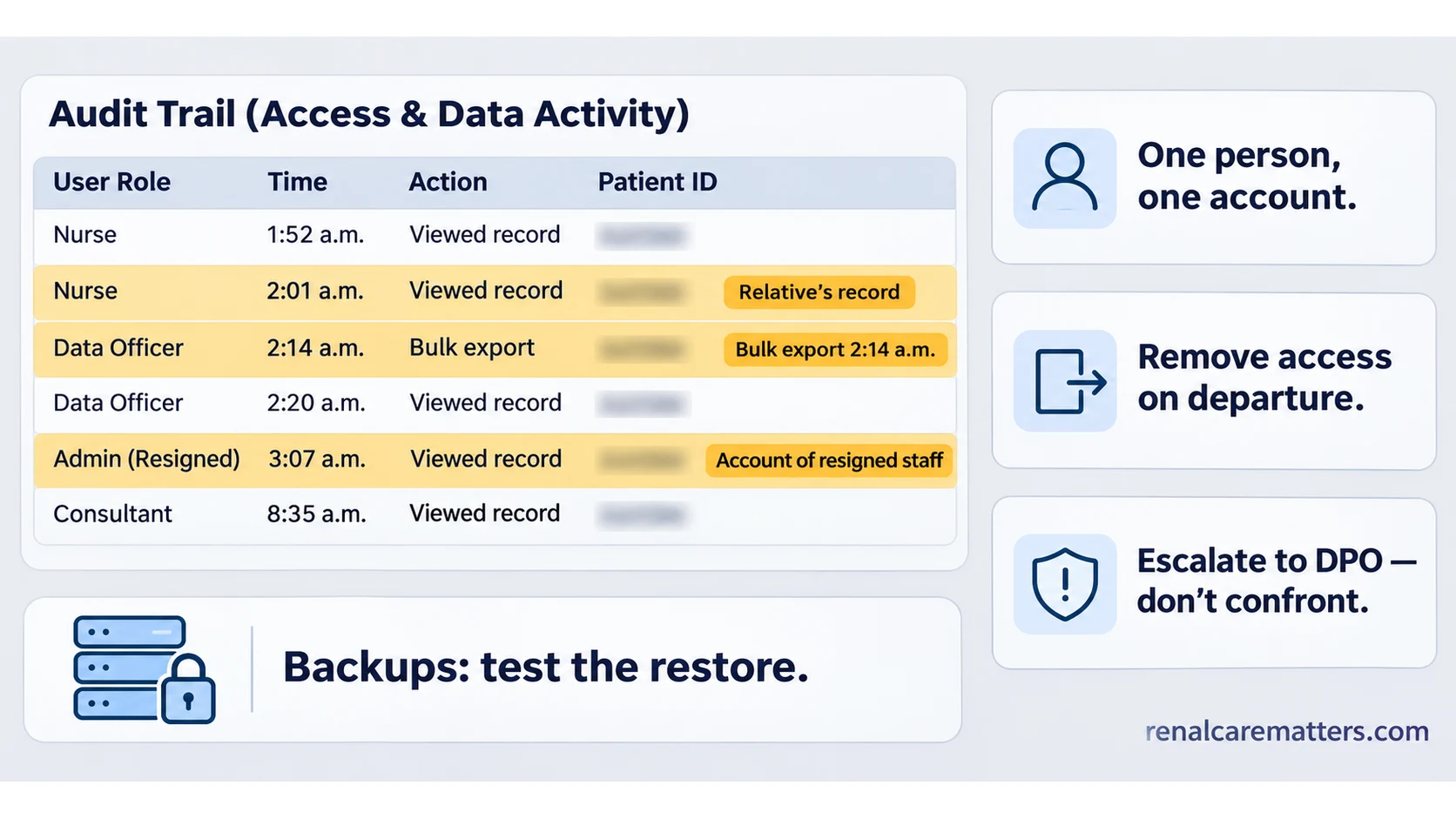
Figure 2. Who looked, when, and why. Individual accounts make the audit trail meaningful.
Most audit-trail entries are ordinary work. A few patterns are worth a closer look.
Access to a patient with no scheduled care, claim, or request that explains it.
A user opening relatives’, neighbors’, or coworkers’ records.
Bulk viewing or exporting of many records.
Access at odd hours unrelated to the user’s shift.
Changes to signed entries, especially near an inspection or a complaint.
A departed user’s account still in use.
Each of these has innocent explanations. A nurse may have been asked by the physician to check a result. A claims clerk may share a surname with a patient by coincidence. That is exactly why you do not decide. Escalate to the data protection officer (DPO) and the unit manager, with the audit extract. Do not confront the user or investigate alone. A confrontation can warn someone who has done wrong, embarrass someone who has not, and spoil an investigation either way.
Devices and backups
Downloads to personal phones, laptops, or flash drives multiply the places a breach can happen. A photo of a run sheet sent through a messaging app to “check something at home” is a copy of health data on a device the unit does not control. Use facility-approved storage and transmission only.
IT owns backups, but records staff have a part to play. During a tested recovery, confirm that restored records and their audit metadata come back intact: the entries, their authors, their timestamps, and the trail of corrections. A backup that restores the text but loses who wrote it has lost the record’s value as evidence. A backup that has never been restored is a hope, not a control.
On the floor · The curious claims clerk
The monthly audit-trail review shows a claims clerk opening the psychiatric consultation note of a patient who is her neighbor. She had no claim pending for him.
The records officer sends the extract to the data protection officer and the unit manager without speaking to the clerk. Their review confirms access without a work reason. The clerk is counseled, her access is narrowed to billing data, and the patient is informed as the controller decides.
The trail only works if someone reads it, and only stays fair if someone else decides what it means.
Illustrative scenario. Names and details are invented.
Lesson · part 3
Why clean data matter beyond the unit
Department of Health and Philippine Health Insurance Corporation (PhilHealth) Joint Administrative Order (JAO) 2021-0002 mandates national health data standards for interoperability, and data submitted to the national health data repository must conform to them.2 PhilHealth is also moving providers toward certified electronic medical records (EMRs) and real-time submission. Its primary-care clinics under the Yaman ng Kalusugan Program (YAKAP) had to move to PhilHealth-certified EMR providers by July 1, 2026.3
That is not yet a dialysis rule, but it shows the direction. Clean identifiers, coded fields, and audit-ready records will increasingly be checked by machines, not only by inspectors. A unit whose records are tidy today will find that transition far easier.
RememberAttribution is the whole point of an audit trail. Shared accounts erase it, dormant accounts invite misuse, and an unread trail protects no one.
On the floor · The coded field that paid off
A unit has recorded the cause of kidney failure as a coded field for every patient since 2022, instead of free text such as “DM?” or “HPN/DM.”
When the unit moves to a certified electronic record in 2026, those fields transfer automatically and pass the new system’s validation checks. A neighboring unit with free-text causes spends three weeks recoding by hand.
Clean data today is the migration you do not have to do later.
Illustrative scenario. Names and details are invented.
On the floor
Real situations: problems and solutions
These are fictional but typical. For each one, cover the answer, decide what you would do, then compare. Where a step depends on local rules, your unit’s procedure and your supervisor’s direction come first.
The physician’s nephew
What you see
A visiting physician asks to see a patient’s record. The patient is his nephew, and he is not on the care team.
What is likely going on
A family interest, not a care relationship.
What to do
Explain politely that access is limited to the care team, and that the patient can authorize a release.
Why it matters
A medical license is not access to every record.
Weekend logins at 2 a.m.
What you see
The audit trail shows a technician’s account viewing 30 records at 2 a.m. on a Sunday, when the unit is closed.
What is likely going on
Possibly a compromised account, possibly misuse.
What to do
Report it to the DPO and the unit manager with the extract, and ask IT about locking the account pending review.
Why it matters
Bulk access at odd hours is one of the clearest warning signs.
The flash drive
What you see
A staff member asks to copy the month’s run sheets to a flash drive to finish reports at home.
What is likely going on
A convenience that moves data off approved storage.
What to do
Decline, and offer an approved way to work, such as remote access set up by IT.
Why it matters
Every copy outside approved storage is a breach waiting to happen.
The restore that lost the authors
What you see
During a test restore, records come back but all entries show the system administrator as author.
What is likely going on
Audit metadata not included in the backup.
What to do
Report the result to IT and the unit manager in writing, and ask for the backup design to include metadata.
Why it matters
A record without its authors has lost its value as evidence.
The relief nurse
What you see
A relief nurse from an agency is working three shifts and has no account.
What is likely going on
A reason to borrow someone else’s login.
What to do
Ask IT and the unit manager for a temporary individual account with an end date.
Why it matters
A temporary account keeps attribution; a borrowed one destroys it.
Field notes
Review accounts every month against the staff roster.
Remove access on the last working day.
Escalate unusual access; do not investigate it.
Test-restore backups and check authors and timestamps.
One person, one account, one reason to look.
Case review
Back to the case: The monthly review
Nurse Robles’s account. Disable it today and document it. Because it was used after she left, escalate that use to the DPO and the unit manager with the audit extract. Someone used her account four days ago, and the unit needs to know who.
“station2.” Retire it and issue individual accounts. Work with IT and the charge nurse on a fast way for nurses to switch users between patients, because the shared account exists to solve a real problem, and the problem will return if nothing replaces it.
Ms. Aguilar. No, you do not speak to her. The access may be innocent, or it may be a relative looking at a family member’s record. Escalate the pattern to the DPO and the unit manager with the extract. They decide the next steps.
What you document. The review date, who took part, each finding, the action taken, who approved it, and the date it was completed.
Each finding had a reasonable-sounding story behind it: a resignation not yet processed, a workaround for slow logins, a shared surname. Part of your role is to look past the story to the log, and to make each month’s review shorter than the last.
Skills lab · with your preceptor
Skills checklist: Access review and audit-trail escalation
Run a mock access review on a fictional user list with your preceptor and IT. Your preceptor rates each step as satisfactory, needs practice, or not observed. Steps marked Critical must all be satisfactory before sign-off. This checklist supports supervised learning; your unit’s own procedure and competency form are the authority. A printable version of every checklist is on the trainer page.
Matches every active account to a current staff member and role.
Identifies dormant, departed, and shared accounts.
CriticalRemoves access on departure and documents it.
CriticalEscalates unusual access to the DPO and manager with an audit extract, without confronting the user.
CriticalRefuses shared credentials and proposes a proper alternative.
States what a test restore must show beyond the record text.
Placement activity. With IT, list every active account in your records system and match it to the staff roster.
Self-assessment
Check your understanding
Each visit draws 8 questions at random from this module’s 15-question bank. Choose the single best answer for each, then select Check answers; an explanation appears under the best answer. Select New set of questions for a different mix. A good target is 7 of 8 on two different sets. Nothing you select is sent anywhere; scoring happens in your browser.
National Privacy Commission. (2023). NPC Circular No. 2023-06 [Minimum security requirements for personal data; confirm the official title before publication]. https://privacy.gov.ph/
Department of Health & Philippine Health Insurance Corporation. (2021). Joint Administrative Order No. 2021-0002: Mandatory adoption and use of national health data standards for interoperability. https://law.upd.edu.ph/wp-content/uploads/2021/06/DOH-PHIC-JAO-No-2021-002.pdf
Philippine Health Insurance Corporation. (2025). PhilHealth Advisory No. 2025-0077: Decommissioning of the PhilHealth eKonsulta system. https://www.philhealth.gov.ph/advisories/2025/PA2025-0077.pdf
Educational material for records staff. Completing it is an Academy learning record only. It does not confer DOH-recognized training credit, a facility designation, or system access, and it does not replace current regulations, your facility’s records manual, or advice from your data protection officer or counsel.