Capture, Indexing, Authentication, and Corrections
Six-field capture, scan quality checks, indexing versus clinical corrections, late entries, and copied text.
PublishedNailathalaGipatikPepalwal:ReferencesMga SanggunianMga TinubdanReng Reperensya:1Audience: Designated medical records officers, custodians, and deputies in standalone and hospital-based hemodialysis units · hospital health information management staff assigned to dialysis · unit managers who supervise recordsRead timeOras ng pagbasaOras sa pagbasaOras ning pamamasa:
Training track for the records officers of hemodialysis units
This module is study material for the records officers of hemodialysis units. It explains the reasoning behind common records decisions; it is not a records manual and not legal advice. Regulations change: confirm every rule against the current text and your facility’s approved policy before you rely on it. Clinical content belongs to its clinical author; questions about a patient’s care go to the attending nephrologist. Every case, name, and identifier is fictional.
Learning objectives
After this module you should be able to
Capture a document against six metadata fields and a page-by-page quality check.
Tell an indexing correction from a clinical correction, and name who may make each.
Record a late entry with both of its dates and explain why backdating is falsification.
Recognize risky copy-and-paste patterns in an electronic record and route them without accusation.
Check every downstream copy after a correction.
Pre-testBefore you read, answer the 8 self-assessment questions and note your score. After the module, select New set of questions and compare. The difference is what you learned; the questions you still miss are what to reread.
Start here
The big picture, in plain words
In plain wordsA scanned page with no label is a photograph in a drawer. You know it is important, but not whose it is, which visit it belongs to, or whether a newer version exists. Labels turn a picture into evidence.
The picture is useful, and it has one limit. A photograph in a drawer at least stays the same. Records change. A nurse corrects a weight. A physician amends an order. A page is rescanned because the first copy was faint. Each change is legitimate, and each one can also be made in a way that destroys trust in the whole chart.
Corrections are where trust is won or lost. A chart that shows its edits honestly survives an audit, even when it contains mistakes. A chart that silently overwrites is presumed unreliable, even where it happens to be right. This module is about capturing documents so they can be found, and correcting them so that anyone can see what changed, who changed it, and why.
Figure 1 · Key terms for this module
MetadataData that describe a document: patient, encounter, type, date, author, version.
IndexingAttaching a document to the right patient, encounter, and document type.
Authoritative copyThe version the facility treats as the official record.
Late entryDocumentation added after the time it describes, carrying both dates.
Electronic health record (EHR)A digital record of a patient’s health information kept and shared across a facility or system.
Audit trailThe system log of who viewed or changed what, when, and why.
Opening case · fictional
Case: The order on the wrong day
It is Thursday and you are working through the week’s scans. Three things land on your desk within an hour.
First, in the chart of Mrs. Rosario Medina, 67, you find a physician order signed by Dr. Antonio Bautista, dated November 12, that changes her dialyzer to a larger size. It is attached to her November 10 session.
Second, the two-page treatment record for Mr. Danilo Cruz’s Tuesday session was uploaded twice. In one copy, page 2 is too faint to read.
Third, Nurse Liza Fernandez stops at your door. “I wrote 58.4 for Mrs. Medina’s post-weight yesterday. It should be 57.4. Can you just fix it in the system? You have access.”
Before reading on, decide:
Which of these can you correct yourself, and which belong to someone else?
What must the system keep when you relink the order?
What will you do with the two uploads?
What do you say to Nurse Fernandez?
Keep your answers in mind. The lesson gives you what you need, and the case review near the end shows one sound response.
Lesson · part 1
Six fields and a quality check
Capture every document against six fields.
Field
Example
What goes wrong without it
Patient identifier
Full name, date of birth, patient number
The page is filed to the wrong person (Module 3)
Encounter
Session date and shift
An order is read as applying to the wrong session
Document type
Run sheet, order, laboratory result, consent
No one can find it when asked
Date of service
November 18, 2026
A late entry looks contemporaneous, or the reverse
Author
The nurse or physician who wrote it
Queries go to the wrong person
Version
Original, amended, superseded
Two versions are read as equally current
Before accepting any scan, check it page by page: legible, the page count matching the paper source, the right way up, signatures present, and the patient matching on every page. A two-page run sheet scanned as one page is not “mostly captured.” Incomplete or poor scans go to a rescan queue, never to the chart with a sticky note promising to fix them later.
Paper originals
For each document class, the records manual should say whether the paper original or the electronic image is the authoritative copy. Write it down; do not leave staff to guess. If paper is kept, track it like any valuable object: checked out, returned, transferred, or disposed of only with a record of who, when, and why. A folder that leaves the records room without a check-out entry is a custody break, even if it comes back the same afternoon.
On the floor · Page two of two
A scanned run sheet for Mrs. Lydia Panganiban looks complete: one page, signed, legible. The paper original, still in the tray, has a second page with the nurse’s note about a hypotensive episode and the saline given.
The clerk rejects the scan and rescans both pages. A month later, when the attending physician reviews why Mrs. Panganiban’s dry weight was changed, the note is there.
A page count check takes three seconds and catches the one page that explains everything else.
Illustrative scenario. Names and details are invented.
Lesson · part 2
Indexing correction or clinical correction
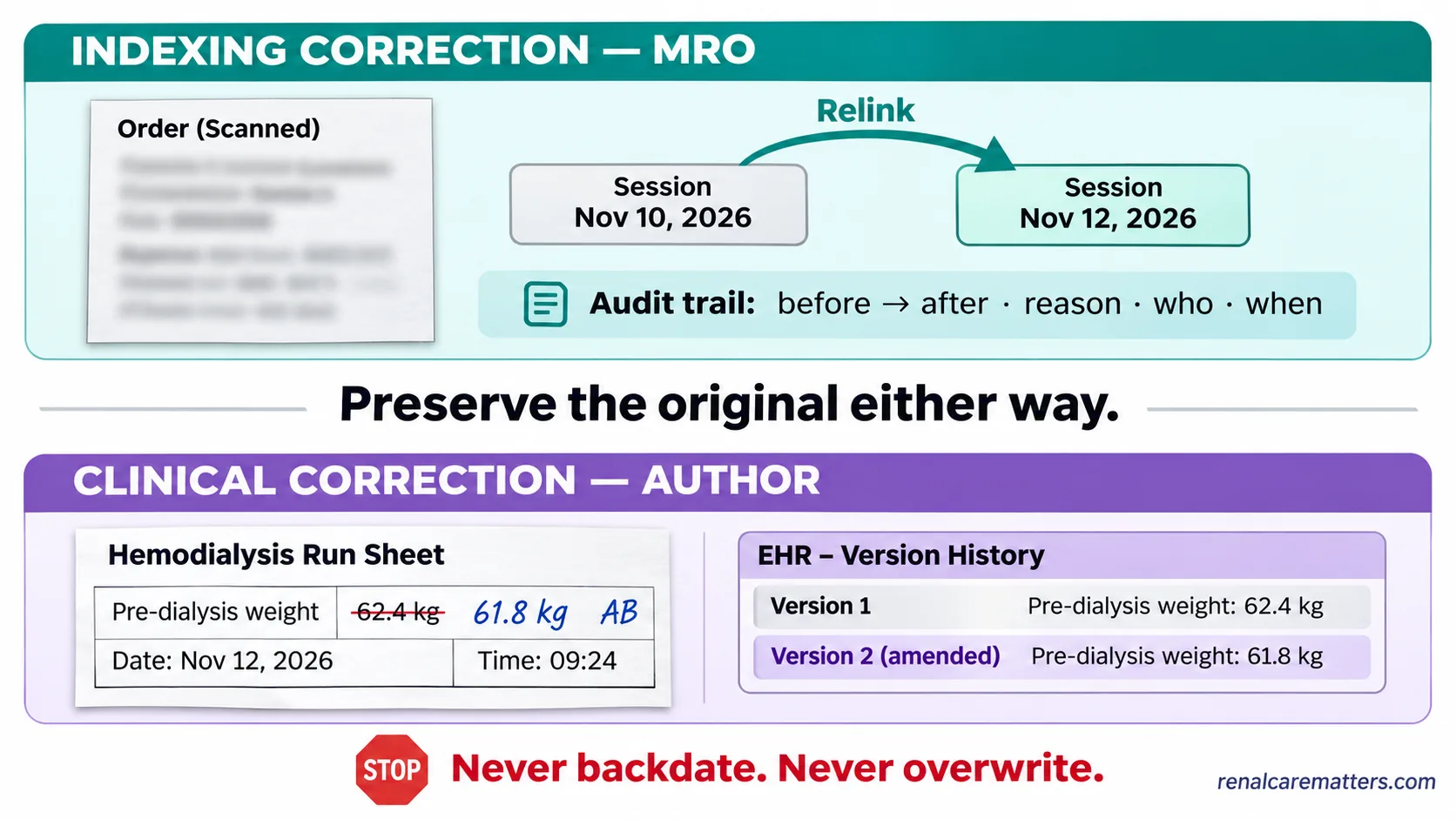
Figure 2. Indexing corrections belong to the records officer; clinical corrections belong to the author. Preserve the original either way.
Every correction falls into one of two kinds, and the difference decides who may make it.
Indexing correction
Clinical correction
What is wrong
Where the document is filed
What the document says
Example
An order attached to the wrong session of the same patient
A wrong weight written on the run sheet
Who corrects
The records officer, through the authorized workflow
The author, or an authorized clinician
What is preserved
Before and after values, reason, actor, time
The original entry, still legible; the new entry dated and signed
Your job
Make the change and check downstream copies
Log the request, route it, and verify closure
A useful test: would the correction change any clinical fact a reader relies on? If yes, it is clinical, and it belongs to the author, even when you have system access to change it. Having the access is not the same as having the authority.
Note one boundary case. Moving a document between two different patients’ charts is not a simple indexing fix. It is an identity correction, and it follows the stricter resolution steps in Module 3.
Late entries keep two dates
A late entry is documentation added after the time it describes. It is legitimate and common: a nurse who was managing a falling blood pressure writes her note after the patient is stable. A late entry carries two dates: the date of service it describes, and the actual date and time it was written. It carries the author’s signature and links to the original session.
Backdating a late entry, so that it looks as if it were written at the time, is falsification. It does not matter that the content is true. The date is a statement too, and a false date makes the entry false.
On paper
On a paper record, correct with a single line through the error, leaving the original legible. Write the correction nearby with initials, date, and time. No correction fluid, no overwriting, no torn-out or rewritten pages, no pasted labels covering the original.
Stop and callNever clean up a chart before an inspection by removing, rewriting, or backdating entries. An honest deficiency is a finding the unit can fix. An altered record is misconduct, and it makes every other page in the chart suspect.
On the floor · Same patient, wrong session
A records officer finds a potassium bath order dated November 12 filed under Mr. Edwin Salonga’s November 10 session. She relinks it to November 12 through the indexing workflow, and the system records the original link, the new one, the reason, and her name.
She then asks the charge nurse whether anyone read the order on November 10. No one had; the nurse on that day followed the standing order. Nothing clinical needs to change, and that answer goes into the correction note.
An indexing correction is yours to make. Whether it mattered clinically is a question for the clinical team.
Illustrative scenario. Names and details are invented.
Lesson · part 3
Copy and paste in the electronic record
Electronic health records (EHRs) make it easy to copy yesterday’s note forward. For a patient who dialyzes three times a week, the temptation is strong: much of today really is the same as Monday.
A systematic review and analysis of safety events, carried out by a United States patient-safety partnership, found that copy and paste can carry outdated or wrong information forward. The partnership recommended that copied text be identifiable, attributable to its source, and reviewed before signing.1 Copying is not forbidden. Copying without reading is the problem.
Records staff are well placed to notice one pattern: the same pre-dialysis weight and blood pressure on several consecutive run sheets. Real patients do not weigh exactly 61.0 kg with a blood pressure of 140/80 on six sessions in a row. The pattern calls for clinical review. It is not proof of error, because some patients really are stable and some machines round values. Route it to the Dialysis Clinical Head with the sessions listed, without accusation, and let the clinical team explain.
The same discipline applies to coded fields. Module 5 covers diagnosis codes from the International Classification of Diseases, 10th Revision (ICD-10), and how to question a note rather than correct it.
RememberAfter any correction, ask whether the document already traveled: to a claim, a registry extract, a released copy, or a transfer packet. If it did, those copies need correcting too.
On the floor · Six sessions at 61.0
Reviewing run sheets for Mr. Florencio Abad, the records officer sees the same pre-dialysis weight, 61.0 kg, and blood pressure, 130/80, on six sessions in a row.
She lists the dates and sends them to the Dialysis Clinical Head with a neutral note: “Identical values on six consecutive sessions, for review.” The review finds the scale at station 3 had stopped updating its display, and a nurse had been copying the screen. The scale is replaced, and the clinical team rechecks Mr. Abad’s actual weight trend.
The pattern was not anyone’s dishonesty. It was a broken scale, found because someone looked at the record.
Illustrative scenario. Names and details are invented.
Lesson · part 4
What a correction trail protects
It can feel fussy to preserve the original of a simple mistake. Consider who relies on the trail.
The patient. If a weight was wrong, the next session’s fluid removal may have been planned on it. The trail shows what the team knew at the time.
The nurse. An honest, dated correction shows she caught her own error. A silent overwrite makes it look as if she hid one.
The unit. In a dispute, a payer audit, or a complaint, a chart with visible corrections is believed. A chart with invisible ones is not.
The trail protects the people who make honest mistakes. That is the point to make when a colleague asks you to “just fix it.”
On the floor
Real situations: problems and solutions
These are fictional but typical. For each one, cover the answer, decide what you would do, then compare. Where a step depends on local rules, your unit’s procedure and your supervisor’s direction come first.
The scan with three pages missing
What you see
A consent form scanned as one page; the paper original has four.
What is likely going on
The scanner fed several pages at once.
What to do
Reject the scan, rescan from the original, check the page count, and accept only the complete version.
Why it matters
A partial consent is not a consent.
Correction fluid on the run sheet
What you see
A run sheet arrives with a weight painted over in white and rewritten.
What is likely going on
A well-meant tidy correction that hides the original.
What to do
Do not file it as clean. Return it to the author with an explanation of the single-line correction method, and log it.
Why it matters
A hidden original makes the whole page unreliable.
The note dated yesterday, written today
What you see
A physician asks you how to make today’s note appear under yesterday’s date in the system.
What is likely going on
A wish to make a late note look on time.
What to do
Explain that the system can record it as a late entry with both dates. Do not backdate.
Why it matters
A late entry is honest; a backdated one is falsification.
The relink nobody checked
What you see
You relink an order to the right session and later find it had already gone out in a claims packet.
What is likely going on
A downstream copy carrying the old link.
What to do
Tell the claims lead and correct the packet through the claims correction process. Note the downstream check on the correction record.
Why it matters
A correction is not finished until every copy matches.
“You have access, you do it”
What you see
A technician asks you to change a machine number on a run sheet because “it’s just a typo.”
What is likely going on
A clinical record entry being treated as an indexing detail.
What to do
Explain that the run sheet’s author or an authorized clinician must correct it, and route it.
Why it matters
System access is not authority to change what someone else recorded.
Field notes
Count pages against the paper source every time.
Write down which copy is authoritative for each document type.
After every correction, ask: where has this document already been?
Praise colleagues who correct their own errors openly.
Never "clean" a chart before an inspection.
Case review
Back to the case: The order on the wrong day
Who corrects what? The misattached order is an indexing correction. It is the right patient, Mrs. Medina, and only the session link is wrong, so you relink it to November 12 through the authorized workflow. The wrong weight is a clinical correction. It belongs to Nurse Fernandez.
What must the system keep? The original association with November 10, the new one with November 12, the reason, who made the change, and when. Then check whether the November 10 session already went into a claims batch or a registry extract with the order attached, and whether anyone acted on a dialyzer change before November 12.
The uploads. Rescan the faint page from the paper original, check the page count, accept the complete legible version, and mark the duplicate as superseded with a reason. Keep the history; do not delete the earlier upload.
What do you say to Nurse Fernandez? Something like: “Thank you for catching it. I can’t change your entry, but you can, and it’s quick. Correct it through the clinical correction workflow so your original stays visible with your correction next to it. Then it’s clear you caught your own mistake.” Log her request and check that it is closed. If Mrs. Medina’s next session has been planned from 58.4 kg, the charge nurse should know today.
Part of your role is to say no to a kind request in a way that leaves the colleague feeling helped rather than refused.
Skills lab · with your preceptor
Skills checklist: Capture, quality check, and correction routing
Scan and correct a set of fictional records while your preceptor observes. Your preceptor rates each step as satisfactory, needs practice, or not observed. Steps marked Critical must all be satisfactory before sign-off. This checklist supports supervised learning; your unit’s own procedure and competency form are the authority. A printable version of every checklist is on the trainer page.
Captures all six metadata fields for each document.
Checks every page for legibility, count, orientation, signatures, and patient match before accepting.
Makes an indexing correction with before-and-after values, reason, actor, and time preserved.
CriticalRoutes a clinical correction to its author and does not edit clinical content, even with system access.
CriticalKeeps both dates on a late entry and refuses to backdate.
Identifies a repeated-value pattern and routes it for clinical review without accusation.
Checks downstream copies after a correction.
Placement activity. Pull five scans from last week and check them against the six fields and the page count. Note every one that would fail.
Self-assessment
Check your understanding
Each visit draws 8 questions at random from this module’s 15-question bank. Choose the single best answer for each, then select Check answers; an explanation appears under the best answer. Select New set of questions for a different mix. A good target is 7 of 8 on two different sets. Nothing you select is sent anywhere; scoring happens in your browser.
Tsou, A. Y., Lehmann, C. U., Michel, J., Solomon, R., Possanza, L., & Gandhi, T. (2017). Safe practices for copy and paste in the EHR: Systematic review, recommendations, and novel model for health IT collaboration. Applied Clinical Informatics, 8(1), 12–34. https://doi.org/10.4338/ACI-2016-09-R-0150
Educational material for records staff. Completing it is an Academy learning record only. It does not confer DOH-recognized training credit, a facility designation, or system access, and it does not replace current regulations, your facility’s records manual, or advice from your data protection officer or counsel.